If you’ve searched for Appollo TV or Apollo TV, you’ve probably come across conflicting reviews, copycat websites, and confusing setup options. Whether you’re in the USA or Canada, figuring out if Appollo TV is real, legal, or even safe can feel like a maze.
This guide gives you the facts about Appollo TV and Apollo Group TV. You’ll learn what the service really is, how to avoid fake sites, how it works on Firestick, Apple TV, Android TV, and more. You’ll also see how the experience compares between the US and Canadian versions.
We cover real user complaints, setup issues, and risks you won’t see on promo pages. And yes, we’re using the “Appollo TV” spelling on purpose. A lot of people type it that way, and most other sites ignore it. But search engines don’t.
By the end, you’ll know exactly where to watch, what’s real, what to avoid, and how to get Apollo TV working without stress.
Table of Contents
What Is Appollo TV (Apollo TV)?
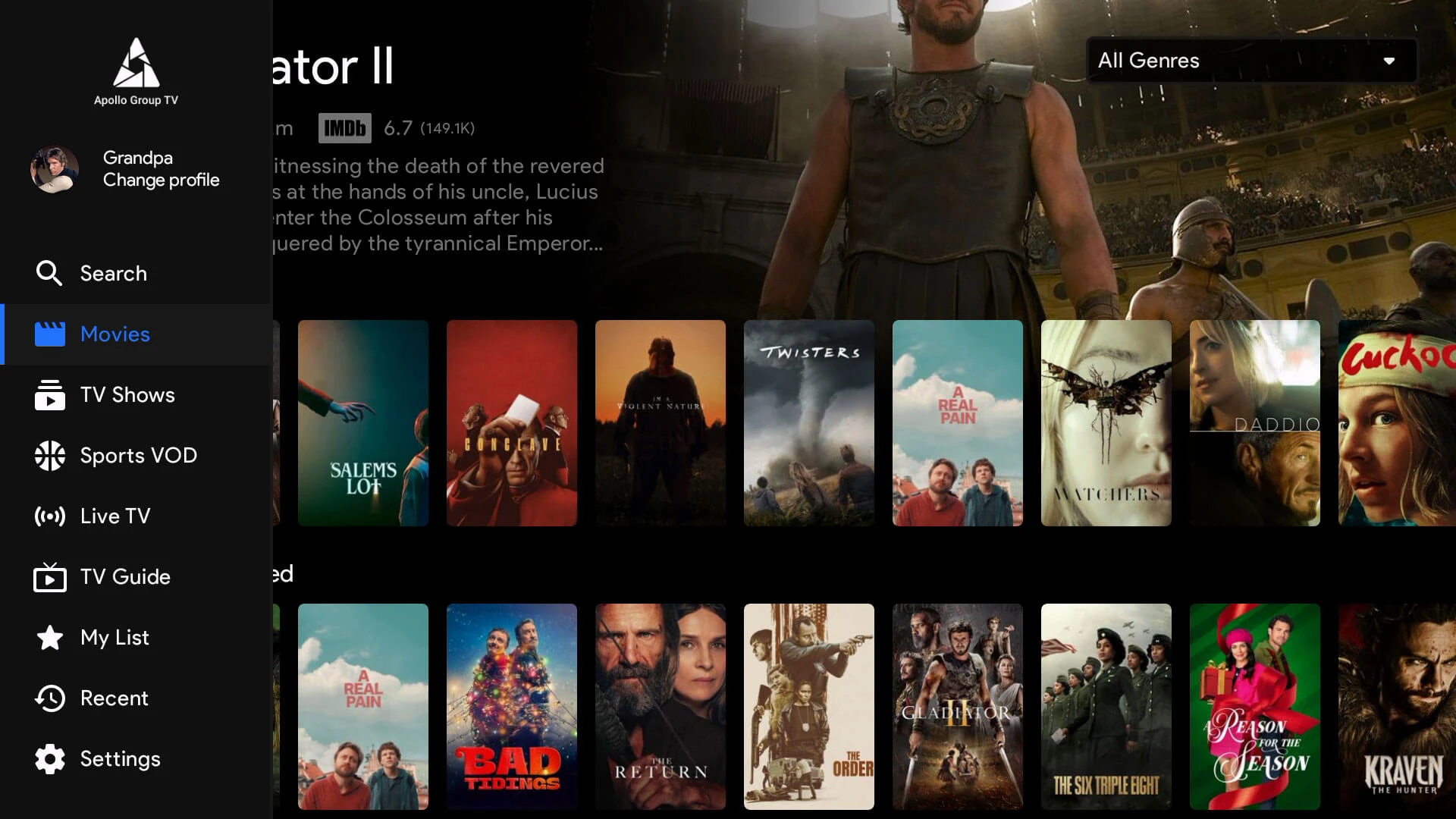
Appollo TV is a live IPTV streaming service that offers thousands of channels, sports, movies, and pay-per-view events. It works across major platforms including Firestick, Android TV, Apple TV, and web browsers. The name often appears spelled both as Appollo TV and Apollo TV, which adds confusion for new users trying to find the correct source.
At its core, Apollo Group TV is the company behind the service. It provides access to high-definition and 4K content, covering everything from international channels to a full video-on-demand library. It’s especially popular in the USA and Canada where traditional cable prices remain high.
What makes Appollo TV stand out from free APKs is the quality of streams and its focus on premium viewing. The app supports multiple devices and is known for streaming reliability, especially during live sports and PPV events.
It’s important to note that Apollo TV is not found in the Apple App Store or Google Play. Users must install it using direct links provided by the official Apollo Group TV site. That makes it essential to use verified sources since many scam clones exist under similar names.
Whether you’re watching on a Smart TV, mobile device, or computer, Appollo TV gives users in both Canada and the USA an alternative to traditional satellite or cable subscriptions.
Is Appollo TV Legit or a Scam?
The question many users ask first is whether Appollo TV is a legitimate service or just another IPTV scam. With multiple copycat websites and confusing branding, the concern is valid.
The official Appollo TV service is linked to Apollo Group TV, which operates as a paid IPTV provider. The company does not list itself on mainstream app stores, which can raise red flags for some. However, this is common among IPTV platforms that avoid third-party app rules.
On Trustpilot, Appollo TV and its parent brand receive mixed reviews. Verified users often praise the quality of HD streams and the variety of live sports channels. At the same time, complaints tend to focus on login problems, device limits, or unclear billing. The Better Business Bureau (BBB) lists several entries for Apollo-related services, some of which are unrelated scam operations using similar names.
The biggest risk with Apollo TV comes from fake sites. Scammers often use slight name variations, cloned logos, or offer deep discounts to trick users into paying for fake subscriptions. That’s why it’s critical to use the official Apollo Group TV site and avoid downloading unknown APK files.
Legality is another factor. Appollo TV does not own broadcast rights. It simply aggregates streams. This puts the legal risk on users, depending on local laws in the USA or Canada. Many people use a VPN to add privacy and reduce exposure to regional restrictions.
To stay safe with Apollo TV, always confirm the URL, avoid social media sellers, and never pay through unofficial channels. While the real service works well for many users, fake versions are everywhere and can ruin the experience before it even begins.
Apollo TV USA vs Canada – Key Differences
While Appollo TV offers the same core features in both the USA and Canada, there are a few important differences that users should know before signing up.
1. Content Availability
Some channels on Appollo TV may be restricted based on your location. U.S. users tend to get a wider selection of regional sports networks and local news channels. Canadian users might notice fewer domestic streaming options. A VPN is often used to access full content across both regions.
2. Payment Options
The real Appollo TV platform usually accepts credit cards and sometimes cryptocurrency. However, availability may vary slightly depending on whether you’re paying from the U.S. or Canada. Canadian users have reported occasional issues with card verification, making it important to check the accepted methods on the official site.
3. Streaming Performance
In most cases, Appollo TV runs smoothly in both countries. That said, users in rural Canadian areas have noted more buffering during peak hours. This is likely due to internet speed and not the service itself. Using a quality VPN with fast servers can sometimes improve the experience.
4. Device Access
Both U.S. and Canadian users can install Appollo TV on Firestick, Android TV, Apple TV, and desktop browsers. There is no exclusive app for either country, but regional guides and support might look different depending on where you’re connecting from.
5. Customer Support Timing
Support teams operate on U.S. time zones. Canadian users might face delays depending on when they submit a request. Always use the support form or live chat from the official Apollo Group TV site to avoid fake agents.
If you’re trying to decide whether to use Appollo TV in the USA or Canada, the service is mostly the same. The real differences come down to content rights, payment ease, and internet conditions.
How to Install Apollo TV on Any Device
Installing Appollo TV is simple if you follow the correct steps for your device. Since the app is not available through official app stores, each platform needs its own setup process. Below is a quick guide for the most common devices.

Firestick and Amazon Fire TV
- Go to Settings and enable “Apps from Unknown Sources”
- Install the Downloader app from the Amazon App Store
- Open Downloader and enter the official Appollo TV download URL
- Follow the on-screen steps to complete the installation
- Launch Appollo TV and log in with your account details
This method works on all Fire TV models including the Fire TV Stick 4K and Fire TV Cube.
Apple TV and iOS Devices
Installing Appollo TV on Apple TV or iOS requires a bit more effort since the app is not in the App Store.
- Use a third-party installer like TestFlight or AltStore
- Download the Appollo TV IPA file from the official source
- Use your computer to sideload the app onto your device
- Trust the developer profile in your iOS settings
- Open Apollo TV and sign in
Due to Apple’s restrictions, this process may need to be repeated after app updates.
Android TV, Google TV, and Chromecast
- Enable “Unknown Sources” in your Android TV settings
- Use the browser or Downloader app to access the official APK
- Download and install Appollo TV directly
- Launch the app and enter your credentials
Chromecast users can screen mirror from a mobile device running Apollo TV, but native support may vary.
Smart TVs, Windows, Mac, and Web Player
Smart TVs running Android can use the same process as Android TV. For non-Android TVs, use a streaming device like Firestick or Chromecast.
Windows and Mac users can access Appollo TV through the web player. Simply go to the official Apollo Group TV site and log in from any browser.
Common Apollo TV Problems and Fixes
Like any IPTV service, Appollo TV can sometimes run into issues. Most problems are easy to fix if you know what to look for. Here are the most common ones reported by users in both the USA and Canada.
1. Appollo TV Login Issues
Some users find that they can’t log in even with the correct credentials. This often happens if the account is used on too many devices. Appollo TV limits each account to a set number of devices, usually five.
Fix: Log out from any device you no longer use. If the issue continues, reset your password using the link on the official login page.
2. Buffering or Stream Freezing
Buffering is one of the most reported problems, especially during live events. While Appollo TV offers high-definition content, your internet speed and connection quality play a big role.
Fix: Make sure you have at least 20 Mbps for stable streaming. Use a wired connection when possible or switch to a different server within the app settings.
3. Appollo TV Not Loading
If the app fails to open or crashes on startup, it might be due to an outdated version or a corrupted install file.
Fix: Uninstall Appollo TV, restart your device, then reinstall the app using the latest version from the official source.
4. VPN Conflicts
Some VPNs block the service or cause login errors. While a VPN can protect your privacy, it needs to be compatible with Appollo TV.
Fix: Switch to a different server location or try a VPN that allows streaming without speed drops. Make sure the VPN is running before you open the app.
5. Audio or Video Sync Problems
This is rare but can happen on certain devices, especially older Smart TVs.
Fix: Restart the app and make sure your device firmware is updated. Lower the stream quality if needed to see if the problem goes away.
By solving these common issues, you can keep Appollo TV running smoothly and avoid most frustrations that new users experience.
Appollo TV Reviews and Complaints
Real user feedback can help you decide whether Appollo TV is worth trying. Like any streaming service, it has both satisfied customers and frustrated ones. Looking at reviews from trusted platforms like Trustpilot and the Better Business Bureau gives a balanced picture.

Positive Reviews
Many users say that Appollo TV offers one of the best values in premium IPTV. They highlight the wide range of live sports, HD channels, and access to new movies. Reviewers in both the USA and Canada report smooth streaming with very few interruptions.
Some mention that the video-on-demand library is updated frequently and includes newer content that usually costs more on other platforms. Another plus is the ability to use Apollo TV across different devices with a single account.
Common Complaints
On the other hand, complaints often mention customer support delays and billing confusion. Some users feel the cancellation process is not clear. Others report being locked out after exceeding the device limit, especially when switching between Smart TVs and mobile apps.
A few negative reviews actually refer to scam websites that mimic Appollo TV. These fake pages collect payments but do not deliver service. This confusion impacts the reputation of the real Appollo TV, even though the service itself may be working correctly.
Trustpilot and BBB Ratings
On Trustpilot, the service has a mix of four and five-star ratings, along with a few one-star reviews mostly tied to login or refund issues. The Better Business Bureau includes reports of unrelated third-party sites using the Apollo name, so not all complaints are about the official provider.
Reading through actual user reviews shows that Appollo TV performs well when used properly and through the official site. Most technical problems come from incorrect setups or misunderstanding the device policy.
How to Avoid Fake Apollo TV Sites
With so many fake versions of Appollo TV online, knowing how to identify the real one is critical. These fake sites often copy the logo, colors, and layout of the official provider to trick people into paying for something that does not work.
Signs of a Fake Appollo TV Site
- Strange URLs
Real Appollo TV links usually include apollogroup or a secure domain ending in dot cc. If the website looks off or uses a completely different name, it is likely a scam. - No Secure Payment Page
The official Appollo TV site uses secure payment gateways. Scam sites often ask for crypto-only payments or use unverified processors. - No Login Section
Fake sites often skip the login page entirely and focus only on sales. The real Apollo TV platform includes a secure login for existing users. - Aggressive Discounts or Flash Sales
Watch out for urgent messages like “Only 5 accounts left” or 90 percent off. These tricks are used to pressure users into making fast decisions. - No Contact or Support Option
A verified Appollo TV site offers customer support, even if it is slow. Scam versions usually have no contact form, no chat box, and no valid email.
What to Do if You’re Unsure
If you are not sure whether a site is official, go directly to the known Apollo Group TV homepage through a trusted link. Avoid clicking on ads or social media posts that claim to be verified unless you know the source. Many scam complaints come from users who found a site through a random comment or sponsored result.
Always double-check the spelling. The difference between Apollo TV and similar names can lead you to the wrong place. Saving the correct link in your browser bookmarks is a good idea once you confirm it is the real one.
Frequently Asked Questions
Is Appollo TV legal in the USA and Canada?
Appollo TV operates in a gray area. It streams content without directly holding the rights. While the service is widely used, legality depends on local laws. In both the USA and Canada, users are responsible for how they access and use IPTV services.
Is Appollo TV safe to use?
If downloaded from the official site, Appollo TV is generally safe. The real risk comes from fake sites that offer cloned versions filled with malware. Always verify the source before installing anything.
How do I fix buffering on Appollo TV?
Buffering on Appollo TV is often caused by low internet speed or overloaded servers. Switching to a wired connection or using a VPN can improve performance. Make sure your device meets the app’s requirements.
Does Appollo TV require a VPN?
A VPN is not required to run Appollo TV but many users prefer it for added privacy. It can also help avoid geo-restrictions, especially when accessing U.S.-only or Canada-only content libraries.
Final Verdict
Appollo TV offers a strong mix of value and convenience for users looking to stream live TV, movies, sports, and pay-per-view events. It works well on Firestick, Android TV, Apple TV, and other common devices. The streaming quality is generally solid, especially for users with fast internet and proper setup.
The biggest risks with Apollo TV come from third-party scams and misleading sites. Many negative reviews are connected to unofficial versions or payment fraud through fake platforms. Users who stick with the verified provider usually report a smoother experience.
When comparing usage in the USA and Canada, the differences are small but worth noting. U.S. users may find better access to regional sports, while Canadians might face slightly more buffering or payment verification issues. A VPN can help solve many of these location-based problems.
If you are considering Appollo TV, treat it like any premium IPTV service. It is not backed by traditional networks or listed in official app stores, but thousands of users continue to use it daily for access to global content. Just make sure you install it properly, use the official site, and understand the terms.
Used responsibly, Appollo can be a useful streaming option. Just stay alert, read reviews carefully, and avoid shortcuts that could lead you to a fake site or broken app.